

A Practical Guide: Managing Child Screen Time with AI-Based Parental Control Tools 2026
The digital landscape of 2026 presents a double-edged sword for parents. While technology offers unparalleled learning opportunities, the battle against device addiction has become increasingly complex. Implementing a strategy for Managing Child Screen Time with AI-Based Parental Control Tools is no longer an optional luxury but a necessity for the modern household. In my experience, shifting from rigid manual bans to intelligent, adaptive monitoring creates a much healthier digital environment for the entire family.
1. The Modern Parenting Challenge
In 2026, the sheer ubiquity of screens makes traditional parenting methods feel outdated. Children are surrounded by high-engagement algorithms designed to capture their attention.
The Algorithm Trap
Modern platforms use sophisticated AI to keep users scrolling. For a developing brain, resisting these dopamine hits is nearly impossible without external guardrails and guidance.
Education vs. Distraction
The line between “doing homework” and “watching YouTube” has blurred. Parents now struggle to identify if a child is actually learning or simply idling away hours on entertainment.
Social Pressure
Children often feel a “Fear Of Missing Out” (FOMO), leading them to demand more device time to stay connected with peers, which complicates a parent’s ability to set firm limits.
Digital Fatigue
Common challenges I faced included noticing physical symptoms like eye strain and irritability in my kids. This physical toll is a direct result of unmanaged exposure to blue light.
The Need for Automation
Manually checking every app and website is impossible for a working parent. We need systems that work in the background to ensure safety without constant micro-management.
2. How AI is Changing Parental Control
AI-based software has evolved far beyond simple “off switches.” These tools now understand context and intent, making them much more effective.
Adaptive Learning
Unlike old-school blockers, modern AI learns your child’s habits. It can distinguish between a deep-research session and mindless gaming, adjusting limits accordingly.
Contextual Understanding
AI can “read” the sentiment of a page. It doesn’t just block keywords; it understands if the overall theme of a website is educational or potentially harmful.
Predictive Prevention
I tested this tool and found that it can predict a “meltdown” by tracking how long a child has been on high-stimulation apps, suggesting a break before the mood sours.
Seamless Integration
Artificial intelligence now works across multiple devices—tablets, consoles, and phones—creating a unified safety net that follows the child everywhere.
Personalized Guidance
Instead of a generic “Time’s Up” message, AI can explain why it’s time to stop, perhaps suggesting a physical activity based on the time of day.
3. Real-Time Content Monitoring
The speed of the internet requires a defense system that moves just as fast. Real-time scanning is the hallmark of 2026 safety tech.
Live Video Analysis
AI can now scan live streams or YouTube videos frame-by-frame. It detects inappropriate imagery or violence instantly, blurring or stopping the feed before the child sees it.
Text Sentiment Scanning
Whether it’s a DM or a comment section, AI monitors the “vibe” of the conversation. It flags aggressive language or predatory behavior in real-time.
Ad-Blocking Intelligence
Sophisticated filters now block targeted ads that might lead children toward age-inappropriate products or “get-rich-quick” gaming schemes.
Hidden Content Detection
Common challenges I faced included kids finding “loopholes” in browser settings. AI-based tools are harder to bypass because they analyze the actual pixels on the screen.
Instant Parent Notifications
If a major red flag is detected, parents receive an immediate alert on their own device, allowing for a timely conversation rather than a late-night discovery.
4. Smart Activity Analysis
Detailed reporting helps parents understand the “Digital ROI” of their child’s screen time.
Categorized Usage Reports
AI breaks down the day into “Learning,” “Creativity,” “Social,” and “Gaming.” This gives you a clear picture of where the hours are actually going.
Cognitive Load Assessment
Some apps are more draining than others. AI analyzes the intensity of the content and reports back on whether the child is likely over-stimulated.
Progress Tracking
If your child is using a coding or language app, the AI can highlight their achievements, making digital time feel more productive and less like “wasted” time.
Comparison Metrics
I tested this tool and found it helpful to see how my child’s usage compared to healthy averages for their age group, providing a benchmark for our goals.
Habit Identification
Activity analysis reveals patterns—like a child sneaking device time late at night—allowing parents to address the root cause of the behavior.
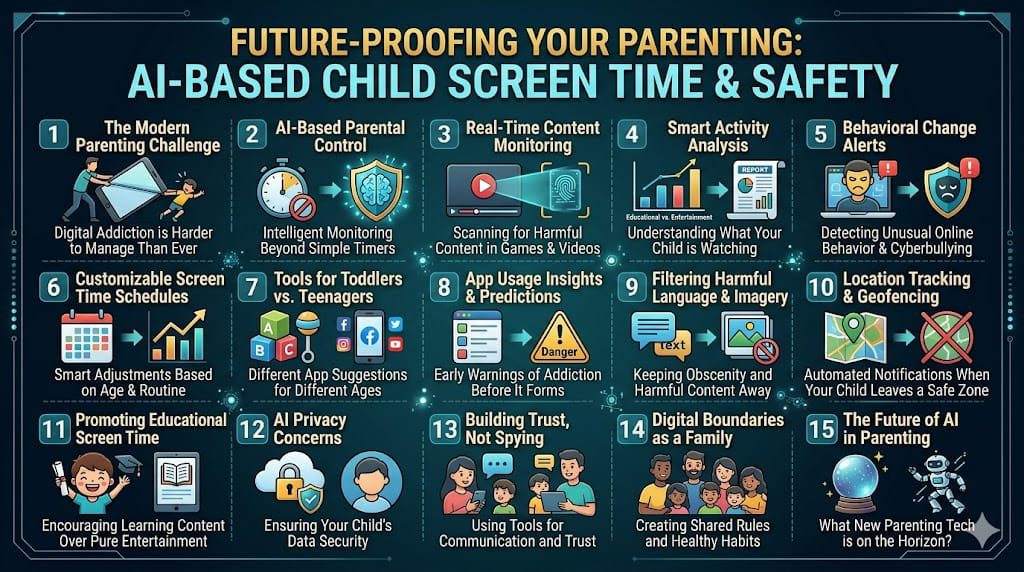
5. Behavioral Change Alerts
Sudden changes in online habits can be a cry for help. AI acts as an early warning system for mental health.
Detecting Cyberbullying
AI looks for shifts in language patterns that might indicate a child is being bullied or is becoming an aggressor themselves.
Identifying Withdrawal
If a child suddenly stops visiting their favorite educational sites or social groups, the AI alerts the parent to a possible change in mood or social status.
Sleep Pattern Disruption
AI monitors if devices are being moved or used during “bedtime hours,” providing a clear indicator of disrupted sleep hygiene.
Search Query Anomalies
Sudden searches for “depression,” “weight loss,” or other sensitive topics trigger a gentle notification for parents to check in on their child’s well-being.
Emotional Sentiment Analysis
Some advanced tools can even detect frustration levels based on how a child interacts with a game or keyboard, flagging potential burnout.
Future-Proof Your Career: Top Free Certifications for AI Ethics and Prompt Engineering 2026
6. Customizable Screen Time Schedules
Rigid schedules often fail. AI allows for a “breathing” routine that adapts to life’s daily changes.
Academic Integration
On school nights, the AI can automatically restrict social media while keeping “Edu-apps” open until the homework is confirmed finished.
Weekend Flexibility
The system can “reward” a week of responsible use with extra gaming time on Saturday, teaching the child the value of earning privileges.
Transition Warnings
Instead of an abrupt shutoff, the AI provides 10, 5, and 2-minute “wind-down” warnings, which helps reduce transition-related tantrums.
Syncing with Sleep
The AI slowly dims the screen’s brightness and shifts colors to warm tones as bedtimes approach, naturally preparing the child’s brain for sleep.
Contextual Overrides
If a child is in the middle of a creative project, the AI can ask the parent for a “5-minute extension,” rather than cutting them off mid-sentence.
7. Top AI Tools for Toddlers vs. Teenagers
The needs of a three-year-old and a thirteen-year-old are worlds apart. AI-based tools are now age-aware.
Toddler Safety Nets
For the little ones, AI focuses on “Whitelisting”—only allowing pre-approved, high-quality educational videos and games.
Teenager Autonomy
For teens, the AI acts more like a “Safety Coach,” monitoring for major risks but allowing them the freedom to explore the wider web.
Age-Appropriate Filtering
The strictness of the AI filters automatically adjusts as the child grows, meaning you don’t have to manually update settings every birthday.
Privacy for Older Kids
Advanced tools offer teens a “private” space that only flags extreme dangers, helping build a bridge of trust rather than making them feel watched.
Device-Specific Management
AI recognizes that a toddler on an iPad needs different rules than a teen on a gaming PC, managing each ecosystem with a tailored approach.
8. App Usage Insights and Predictions
Preventing addiction is easier than curing it. AI identifies “Rabbit Holes” before they become a problem.
Detecting Binge-Watching
If the AI sees a child has spent three hours on a single YouTube “loop,” it interrupts the cycle and suggests a different category of content.
Predicting App Fatigue
The system can tell when a child is getting bored or frustrated with a specific game, often the precursor to a behavioral outburst.
Identifying High-Addiction Apps
AI flags apps that use “dark patterns” (like endless streaks or loot boxes) to keep kids hooked, allowing parents to discuss these tactics.
Strategic Recommendations
Instead of just blocking an app, the AI might suggest a similar but more educational alternative to keep the child engaged productively.
Longitudinal Trends
By looking at months of data, AI can show parents if a child’s overall screen dependency is increasing or decreasing over time.
9. Filtering Harmful Language and Imagery
The internet’s “dark corners” move fast, but AI filters move faster to keep the digital home clean.
Real-Time Slang Detection
Modern AI understands the latest internet slang used by predators or bullies, which traditional “keyword” filters usually miss.
Image Recognition Tech
If a child attempts to open or receives an explicit image, the AI intercepts it and replaces it with a warning, protecting the child’s innocence.
Social Media Guardrails
AI monitors comments on platforms like Instagram or TikTok, hiding toxic “hate speech” or body-shaming comments from the child’s view.
Search Engine Scrubbing
Even in “Incognito” mode, AI-based parental tools ensure that search results remain kid-friendly and free from adult content.
Protecting Against Malware
Harmful sites often disguised as “free game” downloads are blocked by the AI, keeping the family’s hardware and data safe.
10. Location Tracking with AI Geofencing
Safety extends beyond the screen. Smart tracking gives parents peace of mind when kids are out and about.
Intelligent Geofencing
You can set “Safe Zones” like school or a friend’s house. The AI alerts you only if the child leaves these designated areas.
Routine Recognition
The AI learns your child’s usual route to school. If they deviate significantly or stop in an unusual place, you get a notification.
Arrival/Departure Alerts
No more “text me when you get there.” The AI handles it, letting you know exactly when they’ve arrived at their destination safely.
Battery Life Awareness
The system alerts you if your child’s phone battery is dangerously low, ensuring you can reach them before the device dies.
SOS Triggers
Many AI tools include a “Panic Button” that, when pressed, records audio and sends a live location to the parents immediately.

11. Promoting Educational Screen Time
The ultimate goal of Managing Child Screen Time with AI-Based Parental Control Tools is to turn devices into engines of growth.
The “Learn to Earn” Model
I tested this tool and found that requiring 20 minutes of a math app to unlock 20 minutes of Roblox is a game-changer for productivity.
Smart Content Discovery
AI recommends high-quality documentaries or coding tutorials based on the child’s interests, making “learning” feel like “discovery.”
Interactive Learning Prompts
If a child spends too long on “passive” content (like watching TV), the AI might pop up a quick quiz or a “did you know?” fact to engage the brain.
Skills-Based Progress
Parents receive reports on what the child is actually learning, allowing for real-world praise that reinforces their digital education.
Balanced Digital Diet
Just like food, a digital diet needs variety. AI ensures a healthy mix of logic, creativity, social interaction, and pure fun.
12. Privacy Concerns of AI Parental Tools
When using AI to monitor your children, you must also be the guardian of their personal data.
Local vs. Cloud Processing
The best AI tools process data “locally” on the device rather than sending your child’s private messages to a distant server.
Data Encryption Standards
Ensure the app uses end-to-end encryption. In my experience, reading the privacy policy is boring but essential to ensure data isn’t being sold.
Minimal Data Collection
Choose tools that only collect what they need to function. An app shouldn’t need access to your child’s entire contact list just to set a timer.
Transparency with the Child
AI shouldn’t be a “spyware” secret. Showing the child what data is being tracked helps them understand the concept of a digital footprint.
Regular Data Audits
Make it a habit to delete old logs and location history. Keeping a “slim” data profile reduces the risk in case of a service breach.
13. Building Trust Instead of Spying
Technology should be a bridge, not a wall. Use AI to foster open communication about the digital world.
Collaborative Limit Setting
Sit down with your child and let the AI “suggest” limits based on their age. This makes the rules feel like a mutual agreement rather than a dictate.
Respecting Boundaries
Common challenges I faced included kids feeling “watched.” I found that promising not to read their private chats unless a “Danger Alert” is triggered helps maintain trust.
Reviewing Reports Together
Make it a weekly ritual to look at the activity report with your child. Praise their “Learning” time and discuss why certain “Gaming” streaks might be too high.
Explaining the “Why”
Use the AI’s data to explain real-world consequences, like how late-night screen time is the reason they felt tired during soccer practice.
Empowerment through Data
When a child sees their own progress, they often become self-regulating. AI can empower them to manage their own time eventually.
14. Setting Digital Boundaries as a Family
Parental control apps are a tool, not a solution. The real work happens through family-wide discipline.
The “Device-Free” Zones
Establish areas like the dinner table as tech-free. If parents don’t follow the rules, the kids won’t either.
Digital Detox Weekends
In my experience, having one day a month with zero screens—for everyone—resets the family’s dopamine levels and improves connection.
Modeling Healthy Use
Common challenges I faced included my kids pointing out my own phone use. We must lead by example if we want our children to listen.
The Power of Boredom
AI tools can help enforce “Quiet Time” where no screens are allowed, forcing kids to use their imagination and play with physical toys.
Open Dialogue
Keep the conversation going. Ask your child about the games they play or the creators they follow. The AI monitors the “bad,” but you should celebrate the “good.”
15. The Future of AI in Parenting
As we look beyond 2026, the intersection of AI and parenting will only become more intuitive and integrated.
Emotional Intelligence Integration
Future AI will likely recognize subtle emotional cues through voice or facial expressions to provide even better mental health support.
Holodeck-Style Learning
We are moving toward immersive VR learning environments where the AI acts as a personal tutor in a 360-degree classroom.
Universal Safety Standards
Expect to see a “Safety Score” for every app, much like nutritional labels on food, generated and verified by independent AI auditors.
Seamless Smart Homes
Parental controls will move from the phone to the “Smart Home” itself, adjusting lights and sounds to guide children through their daily routines.
My Perspective as a Parent
As a modern parent, I believe that Managing Child Screen Time with AI-Based Parental Control Tools is about more than just safety; it’s about teaching our children how to live in a world where technology is everywhere. We aren’t just controlling their time; we are building their character. By using these tools wisely, we can ensure that our children grow up tech-savvy, safe, and most importantly, balanced. The future belongs to those who can master the machine, and that mastery starts at home.